
Diagnostics
How to choose an electrocardiograph: leads, channels, printing and interpretation
Author: Oleksii Pavlov, CEO of MedBoom
Clarify the technical specification before comparing prices
Electrocardiograph offers often place the words “channels,” “leads,” “automatic mode” and “interpretation” side by side. For procurement, it is important to understand each term separately. Otherwise, two devices with similar names may end up in the same comparison table even though the facility expects different functions from them.
Start with a short list of tasks: which examinations the team will perform, how the doctor will review recordings, where results will be stored and who needs a paper copy. Agree medical requirements with the responsible doctor. The questions below concern equipment and workflow, not independent interpretation of ECGs.
Leads, electrodes and channels
A lead describes how an electrical signal is obtained, while an electrode is a physical contact with the body. A standard 12-lead system uses 10 electrodes, as stated in the ISHNE–HRS consensus statement. The number of electrodes should therefore not simply be equated with the number of traces in the report. The technical principles of recording are described in the AHA/ACCF/HRS scientific statement on ECG technology.
The word “channels” in a catalog must be read in context: does it refer to recording, on-screen display or presentation of the recording? For example, the official M4Medical documentation for M-TRACE separately specifies 3/6/12-channel formats and simultaneous recording of 12 leads. This illustrates why a short label on a product page is not enough. It does not confirm that all models from the brand have the same configuration.
In your inquiry to the supplier, formulate three independent questions: how many leads are recorded simultaneously, how many are visible on screen and which report options are available. Ask for an answer with a reference to the instructions for the exact version offered. This check is more useful than trying to infer a device's capabilities from its name alone.
Check the print format using a sample
The number of traces on one section of a printout and the number of recorded leads should be compared separately. Ask to see a sample of the required format, including indications of speed, sensitivity and active filters. Clarify whether a saved recording can be reprinted without performing a new examination.
For a built-in printer, check the paper type and dimensions in the instructions. For external printing, ask for a list of compatible devices or a demonstration with your printer. Also clarify whether a computer, additional software or a separate license is required. The phrase “A4 printing” alone is not enough to plan a workstation.
Allow in the budget for a supply of paper and electronic storage arrangements. If the report will be transferred to the facility's information system, agree the file format with its administrator before purchase. Ask for a test file without personal data and check whether it opens and is readable in your environment.
Automatic mode and interpretation
Automatic recording, numerical measurements and text interpretation are separate functions. An automatic-recording button does not confirm the presence of an interpretation algorithm. Ask for a demonstration of every claimed capability and an explanation of which results appear in the report.
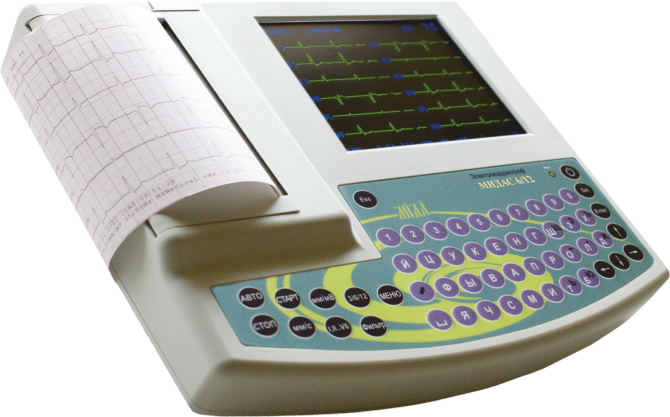
The MedBoom catalog includes the MIDAS 6/12 without built-in interpretation and the MIDAS 6/12 I. The distinction between these versions is confirmed by the MIDA page: version I is specified as having a built-in interpretation algorithm. Agree the remaining specifications and current package contents for the particular delivery.
Computer-generated text is not an independent medical conclusion. The AHA/ACCF/HRS recommendations explicitly call for physician review of computer-generated reports. Therefore, define in advance who will review the recording and approve the result within the facility's workflow. Assess automation as part of this process, without promising diagnostic equivalence between different devices.
Final review of the offer
Compare equivalent packages: device, cable, electrodes, paper, software modules, training and servicing terms. Identify optional functions separately. Before accepting delivery, check the version name on the equipment and in the documents against the agreed specification.
Send MedBoom a list of requirements for recording, printing, archiving and interpretation. This will help prepare a specific comparison of configurations and avoid additional charges for functions that were initially left out of the estimate.